Di2 Frequently Asked Questions
If you have any questions regarding Di2 chances are they are covered either in the Di2 for Dummies page or this list of Frequently Asked Questions.
However, it is of course possible that your specific case is not listed here. In that case just get in touch and I'll do my best to help you get back on the bike!
2x12 Dura-Ace / Ultegra / 105 / GRX bike won't charge
2x12-speed road and gravel bikes are charged through a charging port located on the rear derailleur.
This works well, until it doesn't. Sometimes these bikes will still shift and respond to the mobile app, but when you connect the charger to the rear derailleur, nothing happens. No LED activity, no charging, nothing.
Don't panic, because in most cases there is an easy fix - clean the charging port / terminal with a bit of alcohol. I tend to use 95%+ myself.
Put the alcohol on a piece of cloth and clean the terminal. Just a quick wipe should do the trick.
Even when the terminal does not appear to be dirty, this is what has always worked for me in the past.
App error message: Enter in 6 half-width numerals
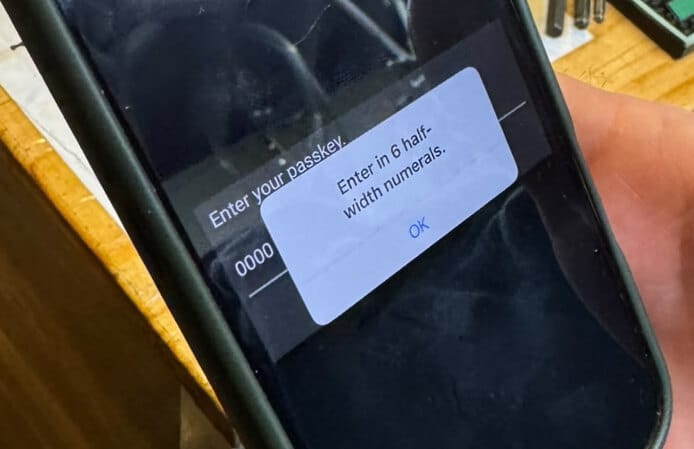
If you're trying to use the Di2 E-Tube Project mobile app, you might have run into this cryptic error message regarding half-width numerals...
Enter in 6 half-width numerals
What does it means? Well.. it's telling you to use a 6-digit passkey. The half-width numerals bit is translated from japanese - there are half-width and full-width characters in Japanese.
You need to use a 6-digit passkey. You have probably used a four or five digit passkey, and that doesn't work. All Di2 passkeys / passwords are always six characters long.
If that doesn't help, send me a message and I'll do my best to help!
How do I install the EW-WU111 D-Fly on my 12-speed Di2 bike?
If you're looking to add the EW-WU111 D-Fly to your new Shimano 12-speed bike in order to enable Bluetooth/ANT and use the mobile app, here's some good news:
All of this functionality is built into the 12-speed rear derailleurs. You do not need any addons to enable BluetoothLE on 12-speed bikes.
In fact, if you were to add the D-Fly to a 12-speed bike, the bike would stop working completely - only one bluetooth-capable unit can be installed on a Di2 bike.
Where do the spacers on 12-speed Shimano cassettes go?
Shimano 12-speed Dura-Ace, Ultegra, 105 and GRX cassettes come with two different spacers between the cassette sprockets.
If you've taken your cassette apart and have mixed up the spacers, getting them back on in the correct order is crucial.
Which spacer goes where?
You can usually tell which spacer goes where by looking at the cassette sprockets. The sprockets with a larger ridge interface with the thin spacers, and the sprockets (or cogs) with next to no ridge go with the thicker spacers.
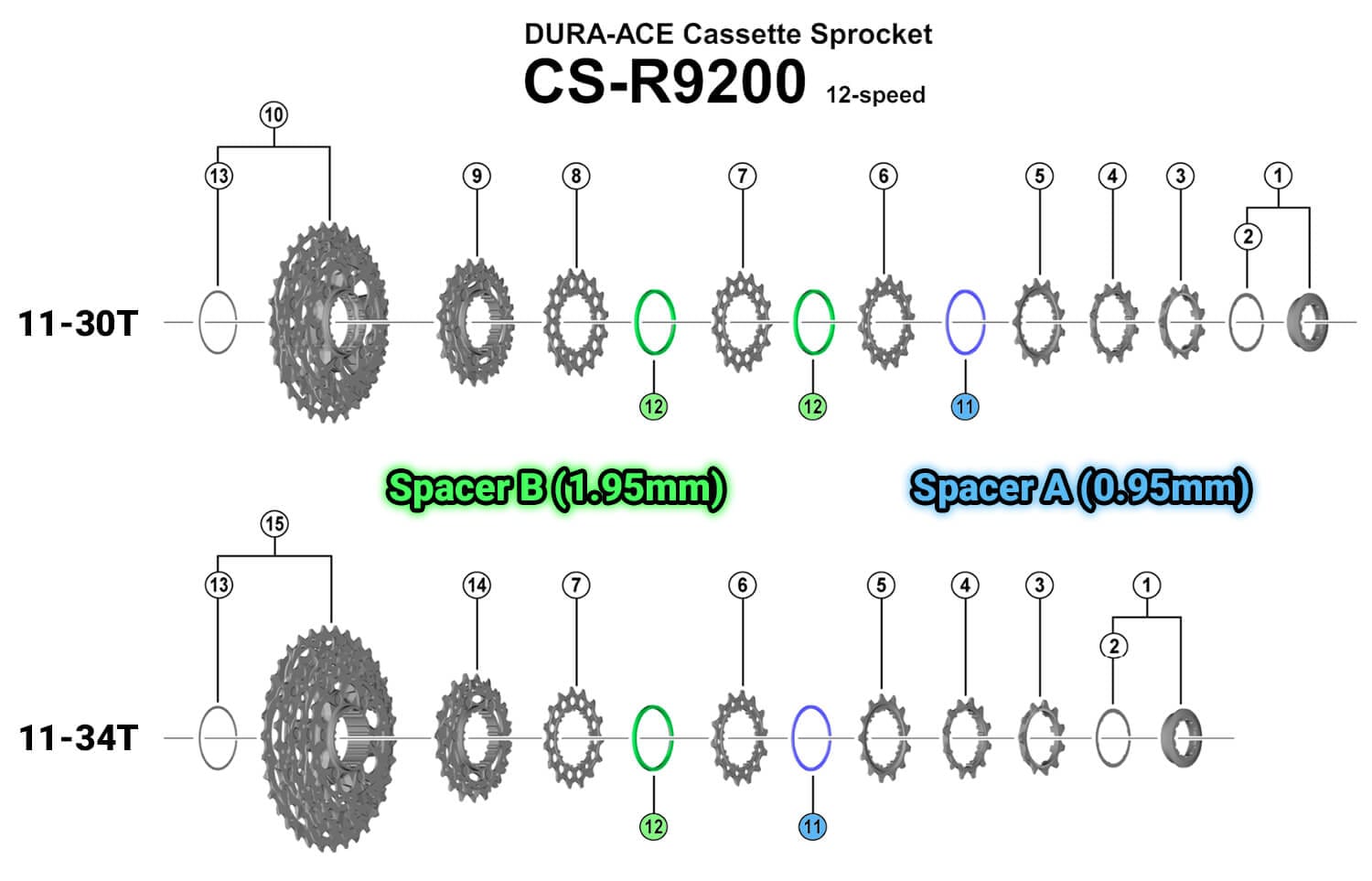
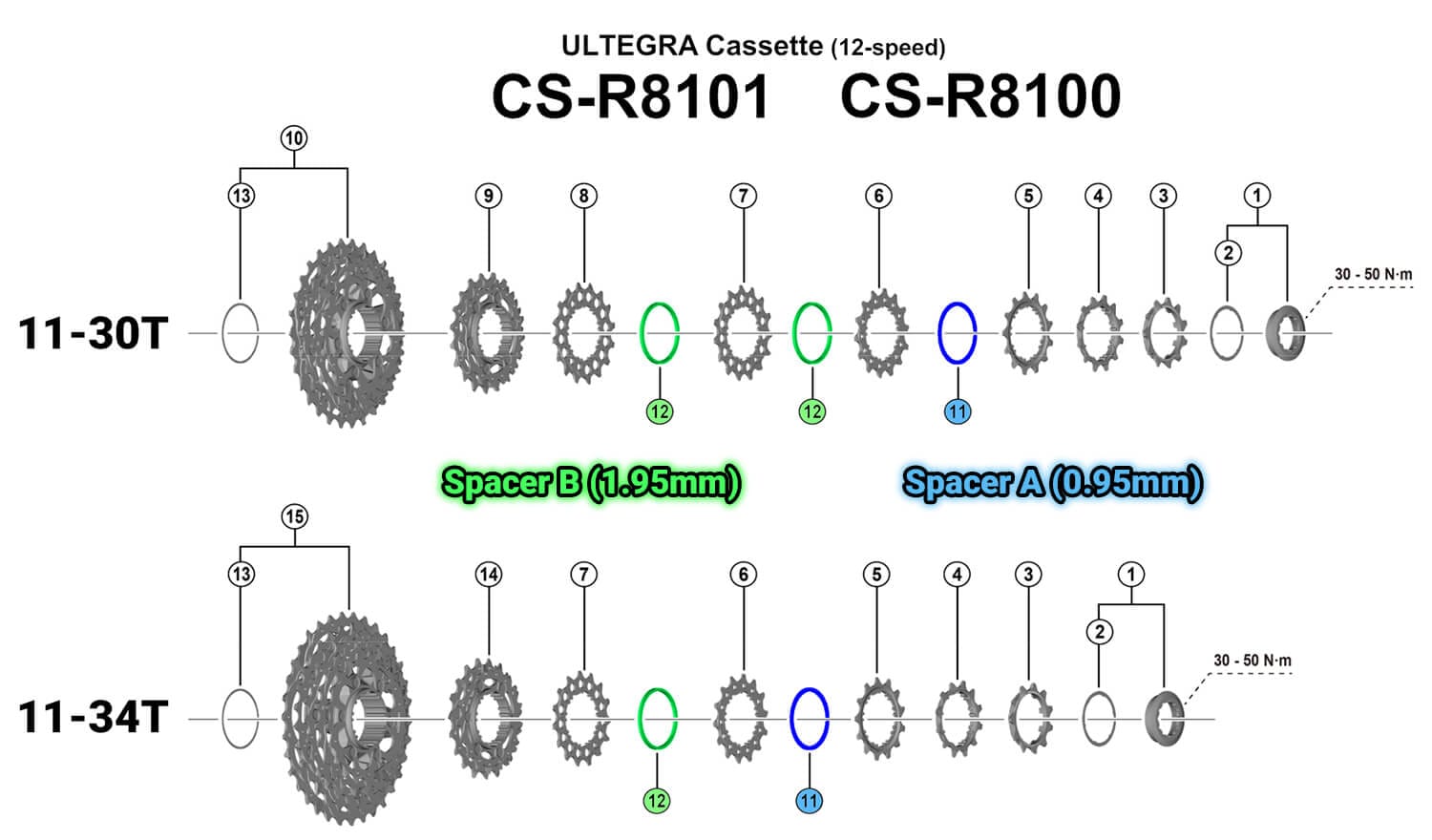
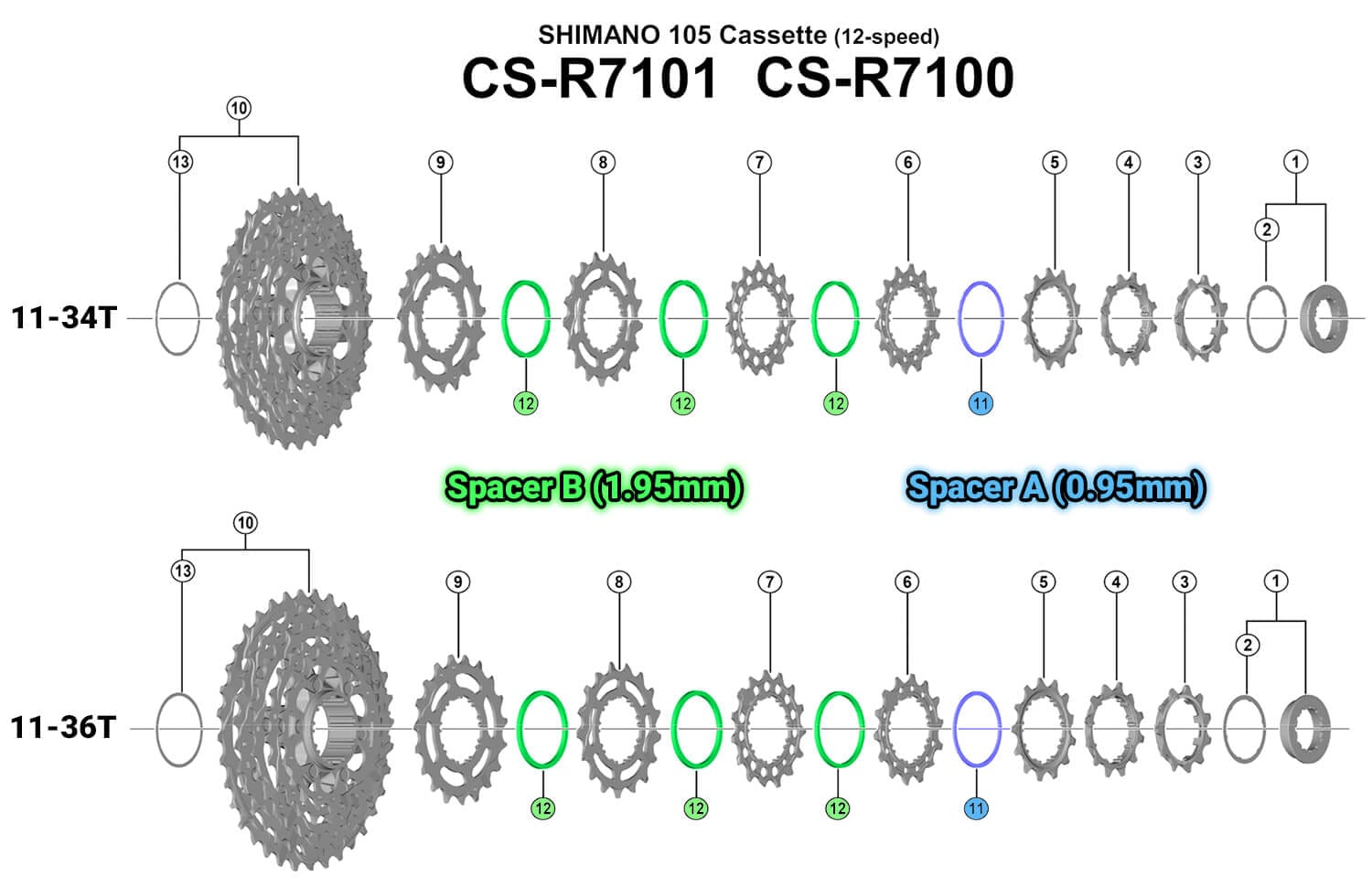
If you prefer a schematic, take a look at the exploded views below:
Dura-Ace R9200 cassette spacers
The 11-30T Dura-Ace cassette has two 1.95mm spacers and one 0.95mm spacer. The 11-34 Dura-Ace cassette has one of each spacer.
Ultegra R8100 / R8101 cassette spacers
Just like its more expensive DA sibling, the 11-30T Ultegra cassette has two 1.95mm spacers and one 0.95mm spacer. The 11-34 Ultegra cassette has one of each spacer.
105 R7100 / HG700 cassette spacers
Both the 11-34 and the 11-36 cassettes have three 1.95mm spacers and one 0.95mm spacer.
Can I use a 12-speed SRAM cassette with my 12-speed Di2?
No, you can't. Not really.
While you can definitely get it to shift through all twelve gears, it won't be great. Using 12-speed SRAM cassettes with 12-speed Shimano Di2 simply does not result in acceptable shift performance.
YouTube Jon Maloney tested this extensively, see the video below.
E-Tube Project 3.4.5: there may be a problem with the internet connection
If you've try to run E-Tube Project 3.4.5 recently, then you have probably gotten a rather confusing message:
There may be a problem with the internet connection or the Shimano's web server. Wait a little while and try again.
While it seems serious, you can actually still use the software. However, it won't download new firmware files from the internet.
E-Tube Project 3.4.5 was released in 2019, and it comes with firmware up to that period. Have a look at Shimano's firmware page to see whether or not there's newer firmware for your components.

So why would you use E-Tube Project 3.4.5 if version 4.0.4 works fine too?
You either have 10-speed components that you need to update, or you need to update the SM-BCR2 charger. See more on updating the charger on this page.
In all other scenarios, I'd probably use version 4.0.4 instead.
Can I use a 12-speed chain or crankset with 11-speed Di2?
Every now and then people ask whether they can use 12-speed chains with 11-speed cranksets, or use 11-speed cranksets or chain rings with 12-speed Di2, or the other way around.
Generally speaking, the answer is "yes" to all of these.
12-speed chain with 11-speed Di2 / cranksets
While the 12-speed chain is slightly narrower than an 11-speed chain, a 12-speed chain works just fine on 11-speed Di2 systems. The inner width is the same as that of an 11-speed chain, and the 12-speed chain will in fact run slightly quieter than the 11-speed chain.
You can use 12-speed chains with 11-speed Di2 derailleurs and 11-speed cranksets and chain rings.
11-speed cranksets on 12-speed bikes
Using a 12-speed chain on an 11-speed bike is not an issue, so can you also use an 11-speed crankset on a 12-speed bike? The answer is... it depends. In 9 out of 10 cases, this will work great. There is one thing to keep in mind though, and that is the difference in chain line.
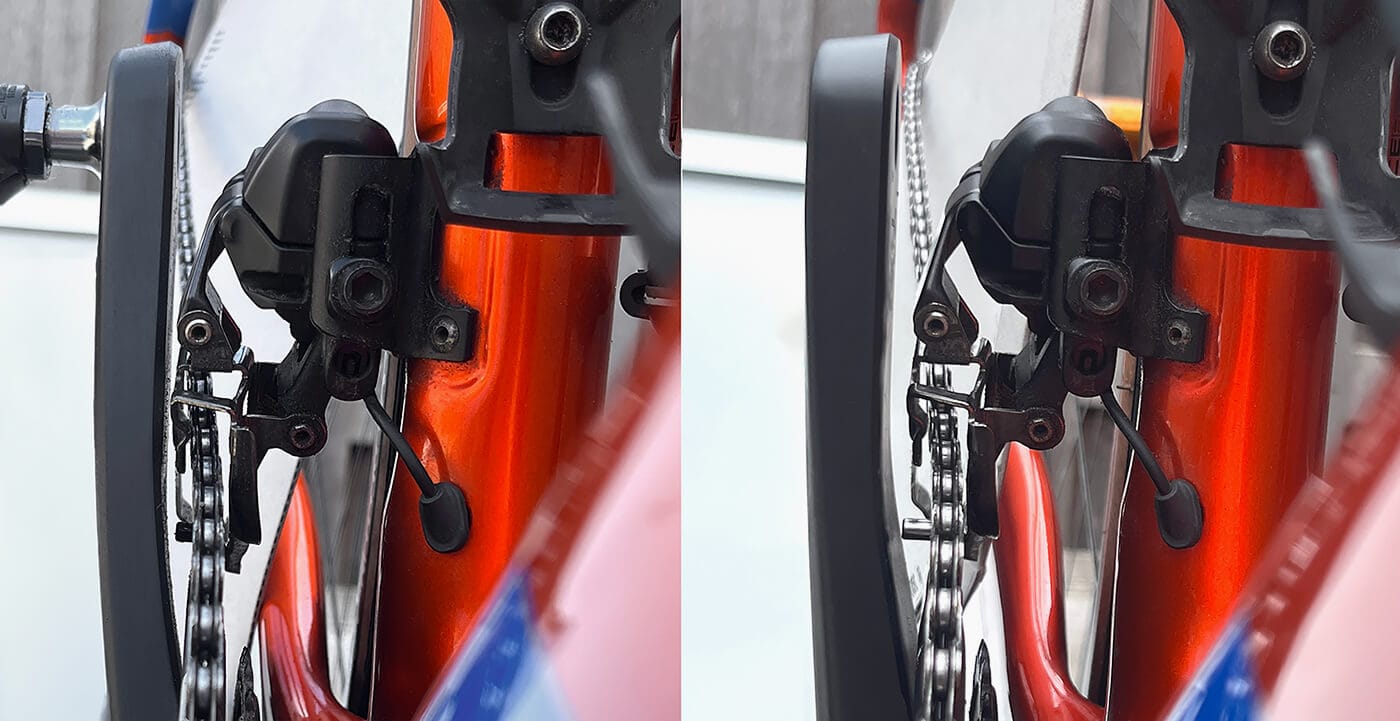
The 12-speed chain line is 44.5mm and the 11-speed Di2 chain line is 43.5mm. In other words, twelve-speed front derailleurs expect the chain rings to be one millimeter further outboard. Usually no problem, as long as you can set up the outer and inner limits of the front derailleur properly - there's only a limited number of adjustments possible after all. On most frames this will not be a problem at all, but it is something to be aware of.
Using 12-speed cranksets on 11-speed bikes
Need to buy a new crankset, but don't want to invest in 11-speed parts? You can usually install a 12-speed crankset on an 11-speed bike with no problem. As mentioned above, the chain line is slightly different, but as long as you can adjust the front derailleur outboard enough.
My TT/Tri bike no longer automatically shifts the front derailleur
Most Time-Trial or Triathlon bikes nowadays are built using single-button shifters. That's great, but it means that there is no button dedicated to shifting the front derailleur.
These bikes rely on Synchronized Shifting to shift the front derailleur - they automatically shift the front derailleur when the rear derailleur reaches a certain point on the cassette.
Sometimes synchronized shift stops working, and that is likely what you're experiencing here. This can be caused by changing settings in E-Tube Project or updating components, but there are plenty of other possible causes. Doing any of these can cause the bike to switch from either of your synchro shift modes (S1 / S2) back into manual mode.
To restore synchronized shift, double-press the button on the rear derailleur (12-speed bikes) or the main junction (11-speed bikes). The LED will then blink to indicate the selected shift mode.
12-speed Di2 synchro shift LEDs
- Blue (2 seconds): Manual shift
- Flashing blue (2 times): Shift mode 1
- Flashing blue (3 times): Shift mode 2
11-speed Di2 synchro shift LEDs
- Solid red/green lights: manual shift mode
- Twice blinking red/green lights: shift mode 1 (default: semi-synchronized shift)
- Three-times blinking red/green lights: shift mode 2 (default: synchronized shift)
Read more on synchronized shift in my complete guide on Synchronized Shifting.
My 12-speed Di2 bike is unresponsive, how to reset 12-speed Di2
In some rare occassions, 12-speed Di2 bikes can become unresponsive. The entire system stops working, charging, and won't shift.
If this has happened to your bike, you can "reset" the system and bring it back to life. Before you get started though, double-check that the bike is actually charged.
Here's how to reset a 12-speed Di2 road/gravel bike:
- Locate the battery. This is usually in the seat post.
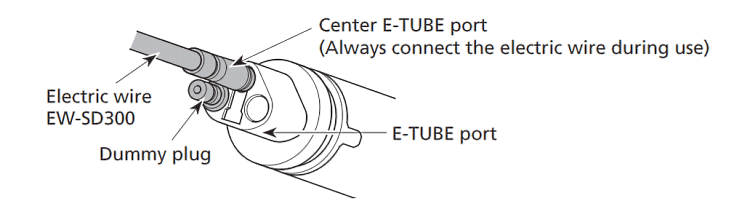
- Disconnect the middle port. Whether there is a wire or a dummy plug in here doesn't matter - unplug whatever is in that port.
- Wait about 15-30 seconds,
- Plug the wire or dummy plug back into the middle port of the battery
You should now be able to shift and charge the bike again. If that doesn't work, please contact me.
When I change my Di2 cassette, do I have to change settings in the app?
No, you do not have to change any settings after you've changed your cassette. Everything will continue to work just the same as it did before.
The Di2 system does not know which cassette you have installed, and it doesn't really care. Don't believe me? Take your wheel off the bike, and shift the derailleurs. You'll notice that they'll shift exactly the same as before.
Chain length and B-gap
Some things you should look at though, are the chain length and the correct B-gap setting for your derailleur.
Especially if you're installing a climbing-focused cassette with a larger max sprocket, you'll probably want to install a larger chain.
Changing the software settings
I wrote that you don't have to change the settings, and that is entirely true.
However, you can change the cassette or chain ring in the software, if you like. This is done in either the derailleur settings or the synchronized shift settings screen.
Doing so will give you more accurate gear usage data (12-speed Di2), and also make sure that the displayed synchro gear ratios are correct.
Note that when you change the cassette or gear rings, the app sometimes invalidates your synchronized shift settings or resets the bike back to manual mode. If you notice that the bike isn't synchro shifting when it should, double-press the function button to switch back into a synchro mode.
How do I update my SM-PCE1 firmware so that I can use E-Tube Project V4?
If you own the SM-PCE1 diagnostics tool then you'll probably want to use that with E-Tube Project v3.4.5 or v4.0.4.
In some cases, E-Tube Project V4 complains that the SM-PCE1's firmware is old.
It doesn't let you update the SM-PCE1, and you cannot use E-Tube Project V4 with an outdated SM-PCE1.
The workaround is simple: you install previous version of E-Tube Project, version 3.4.5, and use that to update the SM-PCE1. Once that is done you can safely use E-Tube Project 4.0.4.
Note that on some older bikes, E-Tube Project 3.4.5 works better than the newer E-Tube Project versions. Either way, you should now be able to use V4 with your SM-PCE1.
Download E-Tube Project 3.4.5 on the Shimano E-Tube Project site or use my E-Tube Project archive page.
Can I use Dura-Ace / Ultegra shifters with 105 Di2 derailleurs?
Yep, you can! In fact, this is something people often do.
12-speed 105 Di2 is excellent, but the shifters don't have any extension ports or top/hood buttons. Also, there are no 105 Di2 rim brake shift levers.
This is generally not a problem unless you want to install clip-on aero bars with satellite shifters, or want to use sprint shifters or climbing shifters . Also, having hood buttons is pretty useful too.
Fortunately you can use 105 Di2 derailleurs with Ultegra or Dura-Ace shifters, no problem!
Want to build a 105 rim brake bike? Use Ultegra or Dura-Ace rim brake shifters.
Want to use satellite shifters? Use the Ultegra or Dura-Ace shifters.
What is the difference between EW-SD300 and EW-SD300-I wires?
There isn't one, really. The EW-SD300-I version of the 12-speed Di2 wire comes with wire holders or Di2 tie-wraps, and that's it.
Internally, both versions are exactly the same, and both versions will work just fine on your 12-speed Di2 bike. Personally, I tend to buy whichever is cheapest - I have plenty of Di2 wire holders lying around myself.
How do I see Di2 info on my HammerHead Karoo 1 or Karoo 2 device?
While most bike computers support Di2 out of the box, the HammerHead Karoo and Karoo 2 are special cases. A couple of months after SRAM acquired HammerHead, Shimano forced SRAM to remove Di2 support from the Karoo devices.
Fortunately for Karoo users, a helpful developer built an app that adds Di2 support back to these devices.
For more information, read this page by DC Rainmaker, or watch GPLama go through all the details in the video below.
E-Tube Cyclist mobile app doesn't start on Android phones
When Shimano updated the E-Tube Cyclist mobile app for Android and iOS in 2022, they changed a bunch of things.
As a result, the E-Tube Cyclist app will not start properly on Android phones when USB debugging is enabled. If your E-Tube mobile app doesn't start, double-check to make sure USB debugging is disabled.
For more information, see the Android page on USB debugging.
FAQ: Di2 Wireless Shifter Battery Replacement: 2026 Guide & Critical 11% Warning
12-speed wireless di2 shift levers (ST-R9270/ST-R8170/ST-R7170/ST-RX825) run on CR1632 batteries.
They last for about 2-4 years and are generally not on top of mind. When they reach the 10% mark though, replace them within a month or you may find yourself without shifters for your next group ride.
The 5-Minute Fix:
- Check your level (Press both buttons).
- Look for the LED on the front of the shifter
- CRITICAL: If you see Red, replace the battery as soon as possible.
Step-by-Step Replacement:
I have a fully illustrated Di2 Battery Replacement Guide that shows exactly how to open the coin cell compartment without stripping the tiny screws and how to purchase the correct batteries.
Prefer a video?
How do I update my wireless R9270 / R8170 / R7170 levers?
If you've tried to update your new 12-speed (wireless) ST-R9270, ST-R8170 or ST-R7170 levers using the mobile app, you might've noticed that you can't. At least not easily.
These levers may be wireless, but they need to be wired to the rest of the system in order to allow firmware update via the mobile app (E-Tube Cyclist). If you do not wire them to the rest of the bike, updating over BluetoothLE/ANT is out.
The mobile app communicates with the Di2 system through the rear derailleur, and it cannot connect to the levers directly. Furthermore, it seems the levers are only capable of receiving a limited set of signals or instructions.. and updating firmware is not part of that.
I have written a guide on updating the firmware on these levers, you can find that right here:
Update your 12-speed hydraulic (wireless) Di2 shift levers.
SM-PCE02 users - no problem
If you own the SM-PCE02, then there is nothing to worry about. You can just connect the SM-PCE02 to the shift lever you'd like to update and update them one at a time. You do need the EW-AD305 adapter though.
This process is also described in the update guide.
E-Tube Project Professional won't work with my charger. I don't own SM-PCE02!
With the announcement of the new DURA-ACE R9200 and Ultegra R8100 groupsets, Shimano launched a new E-Tube Project version - "Professional".
This version is meant to be used by bike mechanics working with bikes on a daily basis. As such, it is not compatible with the SM-BCR2 battery charger or the older SM-PCE1.
If you have an SM-PCE02 then, by all means, use E-Tube Project Professional.
However, if you're trying to connect to your bike using the SM-BCR2 battery charger or the SM-PCE1, you'll need E-Tube Project 3.4.5 or 4.0.4.
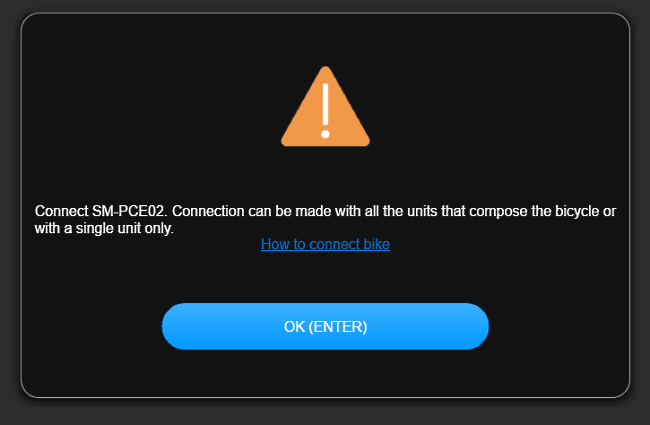
E-Tube Project V5 / Professional states:
Connect SM-PCE02. Connection can be made with all the units that compose the bicycle or with a single unit only.
and also:
This software is not compatible with the SM-BCR2. Please connect a compatible PC linkage device
I recommend using 3.4.5 if you're using the SM-BCR2 and using 4.0.4 if you have an SM-PCE1. Of course, you can use 4.0.4 with the SM-BCR2, but keep in mind that you may need to use the older E-Tube Project version to update the charger before it'll work with version 4.0.4. You can find versions 3.4.5 and 4.0.4 on the E-Tube Project Archive page.
How can I determine a Shimano component manufacturing date?
Shimano use a simple 2-letter date code, printed on each component or on a sticker or label. You'll usually find this near the component's serial code.
The first letter indicates the year, the second stands for the month. Use the lists below to determine when your component left the factory.
First letter (year)
- A - 2002
- B - 2003
- C - 2004
- D - 2005
- E - 2006
- F - 2007
- G - 2008
- H - 2009
- I - 2010
- J - 2011
- K - 2012
- L - 2013
- M - 2014
- N - 2015
- O - 2016
- P - 2017
- Q - 2018
- R - 2019
- S - 2020
- T - 2021
- U - 2022
- V - 2023
- W - 2024
- X - 2025
- Y - 2026
Second letter (month)
- A - January
- B - February
- C - March
- D - April
- E - May
- F - June
- G - July
- H - August
- I - September
- J - October
- K - November
- L - December
An example
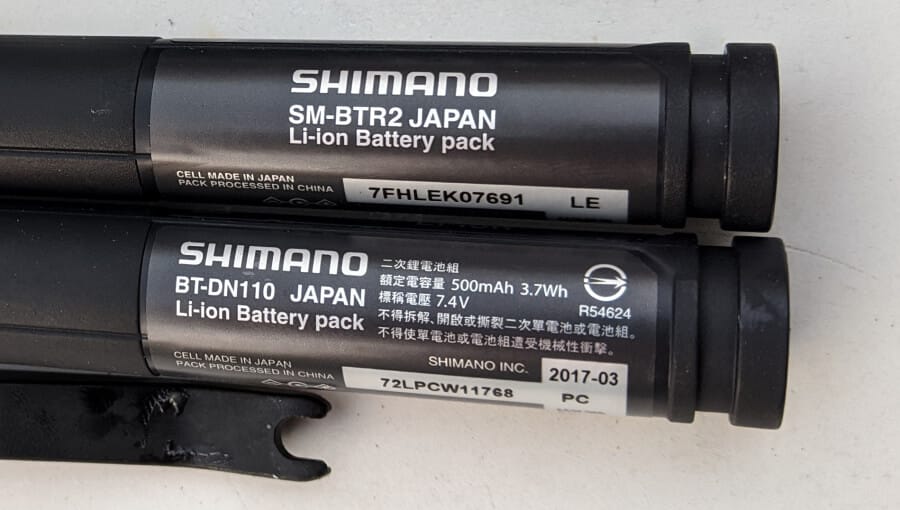
Have a look at the two batteries below. The top battery was built May (E) 2013 (L) , the other one in March (C) 2017 (P). We can easily confirm the date of the bottom battery, it's printed right above the date code.
Also, the SM-BTR2 is older than the BT-DN110, so they dates make perfect sense.
How do I update my SM-BCR2 Charger firmware so that I can use E-Tube Project?
If you've installed E-Tube Project 4 and you're using the SM-BCR2 charger then you may have gotten a cryptic message starting E-tube Project:
SM-BCR2 recognition. The process is interrupted because the version of SM-BCR2's firmware is old. Connect to the Internet and download the latest version of the firmware.
E-Tube Project tells you to update the SM-BCR2 charger before you can actually use E-Tube Project. Unfortunately, the only way to update the SM-BCR2 is by using E-Tube Project.
The workaround is simple: you install previous version of E-Tube Project, version 3.4.5, and use that to update the charger. E-Tube Project 3.4.5 automatically updates the charger in the background when you use it to connect to a bike.
Once that is done you can safely use E-Tube Project 4.0.4. Keep in mind that, while most issues have been fixed, there are still some bugs left in version 4.0.4 and E-Tube Project 3.4.5 may actually work better with older parts.
Download E-Tube Project 3.4.5 from the Shimano E-Tube Project site (scroll down to version information) or use my E-Tube Project archive page.
How can I reset my Di2 system?
Unfortunately there is no such thing as a Di2 reset - the closest you can get to a full reset is to disconnect the battery for 30 seconds and then reconnect it. That will cut power to all components and restore them to a somewhat 'neutral' state.
Having done that it can also be a good idea to connect your bike to a Windows computer and then reset all values to their defaults.
For 12-speed Di2 bikes, be sure to disconnect the battery middle port. Even if there is just a dummy plug in there, just unplug that, wait 15 seconds or so, and plug it back in. That should bring your 12-speed bike back to life.
Note that you cannot easily connect 12-speed bikes to a Windows computer - the SM-PCE02 is required to do that.
When should I replace my Di2 battery?
The easy answer is: when it no longer holds charge or depletes very quickly.
Shimano say their battery is rated for 300 full charge cycles. This means that if you charge the battery every other week it should be good for about 11 years.
Of course some batteries fail before that and some fail after that - but this is the Shimano guideline: 300 full charge cycles.
How do I check the battery charge level?
10-speed and 11-speed Di2
Press and hold any of your shifting buttons for at least half a second. The colour and the amount of flashes of the junction box LED indicates how much charge is left.
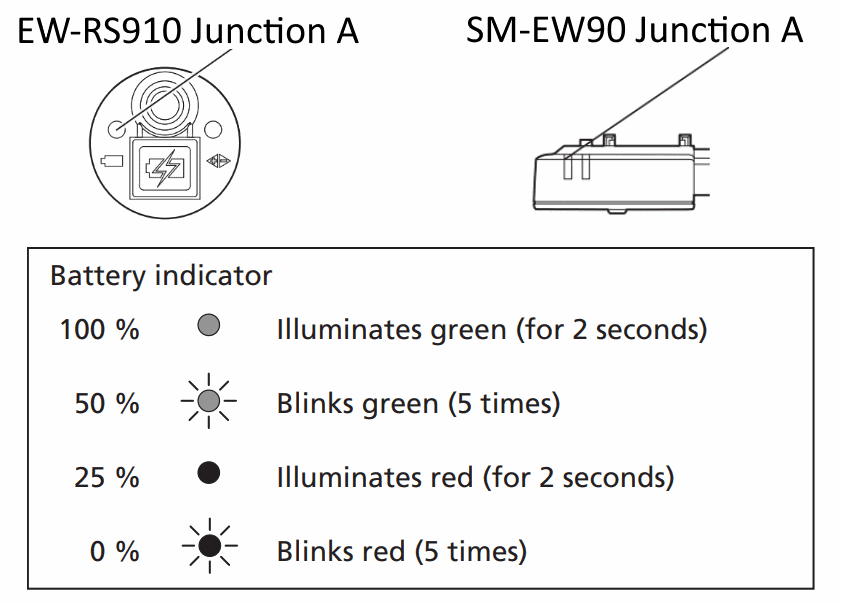
Of course the LEDs cannot flash if the battery is completely empty, which is why a more accurate approximation would be:
- Green for two seconds: more than 75%
- Green, flashing 5 times: 50% – 75%
- Red for 2 seconds: 25% – 50%
- Red, flashing 5 times: less than 25%
Please note that when you have 10% or less charge remaining, the front shifting will cease to function. You’ll be stuck in the chainring you selected.
Depending on your firmware version, it’ll also display flashing lights to indicate the shifting mode you’re in.
12-speed Di2
For 12-speed Di2, both the button and the LED moved to the rear derailleur.
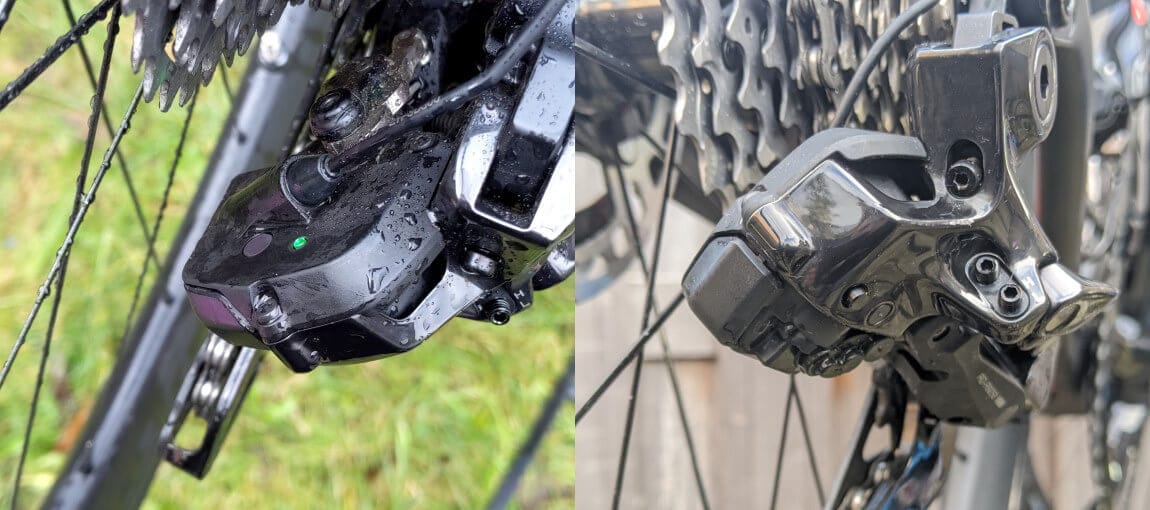
Checking the main Di2 battery charge level is really easy - you just press the rear derailleur button.
Pressing the button for 0.5 seconds or less will turn on the LED, indicating the remaining battery charge.
- Solid green: 100% - 51%
- Flashing green: 50% to 26%
- Red: 25% to 1%
- Off: 0%
If you'd like to check your (wireless) shift lever battery, press-and-hold both of the shifter's buttons for about 0.5 seconds.
The lever's LED will then switch on, showing you a rough battery level indication:
- Green: 11% to 100% battery
- Red: 1% to 10% battery level
- No LED: 0%
Once the (CR1632) battery reaches 10%, you've got about a month to replace it. It'll go completely flat after that.
Changing the batteries is really simple, and only takes a couple of minutes. Read all about this in the Replace Wireless Shift Lever Battery Guide.
Can I use my Dura-Ace Di2 7970 with newer hardware?
No, you can’t.
While most Di2 hardware can be mixed across different series, you cannot use 7970 with any other, newer, Di2 hardware. This is because it uses a different wiring system (4/5-conductor vs 2-conductor e-Tube).
I read that I can mix different series hardware. I tried, but it doesn’t work?
It's complicated.
You can use 11-speed derailleurs with 10-speed shifters and the other way around, and you can use 11-speed di2 with other 11-speed Di2, as long as you stick to a number of rules - don't mix MTB and road/gravel, for example.
Also, you may have to update your component firmware before it'll recognize the different generation / series hardware.
Have a look at the pages on how to connect your bike to a windows computer and how to update Di2 firmware for more information on this subject.
Note that you can not use 11-speed components with 12-speed Di2, except for the SW-R9150 satellite shifter and some TT/tri shifters.
How long will the battery charge last?
A Shimano BT-DN110 battery should last for at least 2000km per charge. When used normally you can expect to get about 2500-3000km of riding out of a single charge, depending on how often you shift and how you shift.
A Di2 front derailleur uses about 4 times more power than a rear derailleur will per shift.
12-speed BT-DN300 road/gravel systems generally go about 1000-1500km between charges, but again, this depends on how the system is wired or not, and shifting habits.
If you're on a 12-speed wireless MTB you'll do a lot more shifter per km, and you should get about 300-500km out of the BT-DN320 derailleur battery.
How does this site generate income?
The great thing is - it doesn't have to! The costs of running this site are relatively low, due to some clever optimizations done in the site building process. This means the site can operate completely independent. There are no advertisements and no one tells me what I can or cannot write.
There are affiliate links on this site, of course - any income generated by these links goes straight back into the site. I use that to buy new Di2 components to experiment with.
Can I use a GRX crank with a road or MTB front derailleur?
The answer is.. it's complicated. The GRX chain line moved 2.5mm outwards compared to a traditional road chain line.
While the official answer is that you must also use a GRX front derailleur, some users have reported being able to use a road front derailleur without issues
Do I have to use a B Junction in my Di2 build? (11-speed Di2)
No, you don't. The only requirements in an 11-speed Di2 system are:
- A battery
- Junction A
- Rear derailleur
- Shifter (1)
Note that using a junction B does make sense though, it makes wiring up the system so much easier!
12-speed road bikes use a battery with three ports and you wouldn't use a Junction B on those, except for rim brake bikes or time-trial bikes.
Can I use the MT800 display on my road bike?
Yep! You can use the MT800 digital display with BlueTooth instead of a Junction A (internal/external). It has three e-Tube ports, shows the battery level, shifting and suspension modes and gear position.
Have a look at the compatibility chart for more information on mixing road and mountain bike components.
Keep in mind that the SC-MT800 and SC-M9051 have wireless functionality built in - they will not work if any other bluetoothLE device is installed on the bike.
How do I reset Di2 crash mode after a crash?
Your rear derailleur has probably gone into crash mode. This means the motor has disengaged from the cage, blocking any further shifting. In order to restore normal operation, first make sure your rear derailleur and derailleur hanger are not damaged.
10-speed and 11-speed Di2 crash mode reset
To reset crash mode on 10-speed (6770) and 11-speed Di2 (6870, 9070, R8050, R9150, GRX), you get on your bike and press and hold the button on your junction box for 5 seconds until a red light flashes.
The rear derailleur will now go through all the gears, so make sure sure you spin the cranks until it’s done. Once it has gone through all the gears you’re done and ready to get back to enjoying your ride.
12-speed Di2 crash mode reset
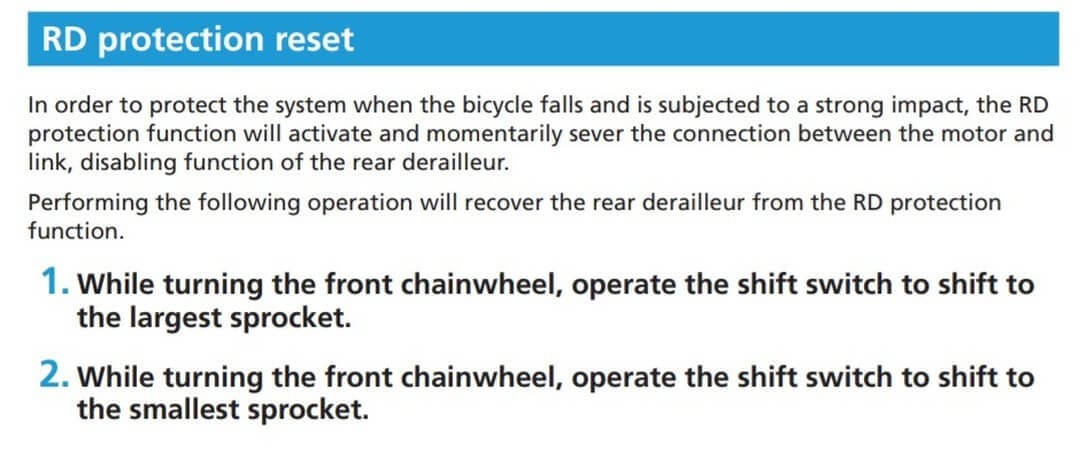
Resetting crash mode on 12-speed R8100/R9200 Di2 works slightly differently. Since the button is on the rear derailleur itself, you cannot press that while riding.
Instead, you first shift to the largest sprocket, and then all the way to the smallest sprocket. That should reset the rear derailleur crash mode.
Can I use my road shifters with mtb derailleurs? Or the other way around?
Yes, you can! This is done quite a lot by Di2 users who want to run a 1x setup only (no front derailleur) – on their gravel bikes for example. Have a look at the compatibility charts – they list which derailleur models are compatible with which shifters.
Generally speaking, the only real limitation in a modern Di2 system is that all derailleurs on the bike must be from the same category. This means that all derailleurs must be mountain bike derailleurs, or all derailleurs must be road (/ GRX) derailleurs.
How do I use e-Tube software on my Apple Macbook?
Unfortunately Shimano's E-Tube Project software is not available for Macs. This can be a real problem to those wanting to update their Di2 firmware.
Shane Miller (GPLama) has recently published a video on running E-Tube Project on your Mac using a virtual machine.
- Take your bike and your SM-BCR2 charger to a friend and hook it up to their Windows laptop/pc
- Take your bike to a good Local Bike Shop (LBS) and ask them to update your Di2 firmware. They will be glad to help at low or even no cost
- Install the e-Tube project mobile app (if you have the Wireless Unit) and update firmware that way. Be aware you may need to reset the system.
My Di2 won't connect to the mobile app
First things first: if yours is an 11-speed bike, make sure you have the Wireless Unit (EW-WU110/EW-WU111).
It is an optional component and most Di2 bikes do not ship with this unit installed. 12-speed bikes come with wireless/bluetooth connectivity standard.
To enable Bluetooth connection mode to connect to the bike, press the button on your junction box (or rear derailleur for 12-speed) for about two seconds (until the red/green lights start flashing). If this doesn’t happen at all, try updating your firmware. The SM-EW90 junction box (that’s the below-the-stem version) should be on at least firmware version 3.0.4. Connect the bike to a windows pc to make sure it is up to date.
If this does not solve your problem, please contact me and I’ll try to help the best I can!
More LEDS come on after I check the battery level - what do they mean?
When Shimano introduced Synchronized shifting june 2016 they also changed the behaviour of the Junction A. When you check the Di2 battery level the LEDs on your junction box will first indicate the battery level, turn off and then illuminate again to indicate the selected synchro-shift mode.
For 11-speed bikes, the different modes are:
- Red and green LEDs turn on for two seconds: manual shift
- Red and green blink two times: synchronized shift mode 1
- Red and green blink three times: synchronized shift mode 2
12-speed bikes use the rear derailleur LED to indicate the selected shift mode:
- Blue (2 seconds): Manual shift
- Flashing blue (2 times): Shift mode 1
- Flashing blue (3 times): Shift mode 2
Has your bike suddenly started doing this, even though you’ve had it for a long time? Your junction A firmware has probably been updated by either you or your local bike shop.
I can't remember my e-Tube mobile app passkey. How do I reset that?
If you’ve forgotten your e-Tube wireless passkey you can reset it by connecting your bike to a computer and running the e-Tube windows application.
Read the post on changing your wireless passkey using a Windows computer.
Where is the Di2 manual?
You probably didn’t get a manual with your bike, but you can find Shimano’s own manual right on their website: https://si.shimano.com.
I have also uploaded the files to bettershifting.com for your convenience and written an 11-speed new user guide as well as a 12-speed new user guide.
How do I connect or disconnect Di2 electric wires?
I recommend you use Shimano’s TL-EW02 cable plug tool to connect and disconnect your 10-speed and 11-speed components. For 12-speed EW-SD300 wires, use the TL-EW300 tool.
These tools make it so much easier to connect things properly, especially 12-speed wire.
Note that when plugging in a Di2 wire you should feel and hear a click when connecting your wires.
What do I need to use Synchronized Shifting?
Synchronized Shifting is available to everyone running current or previous generation Di2 with up-to-date firmware and the BT-DN110 battery or BM-DN100 external battery mount installed.
The synchronized-shifting compatible series are:
- Ultegra 6870
- Ultegra R8050
- DURA-ACE R9000
- DURA-ACE R9150
- GRX 11-speed and 12-speed
- 105 R7150
- Ultegra R8150
- DURA-ACE R9250
Synchronized Shifting is also available on mountain bikes. In order to use synchronized shifting on a mountain bike you need up-to-date firmware, the BT-DN110 battery or BM-DN100 external battery mount and also a System Information Display (SC-M9050, SC-M9051 or SC-MT800).
The synchronized-shifting compatible mountain series are:
- XTR M9050
- Deore XT M8050
- Newer e-bike Di2 MTBs
Do you want to read more on synchronized shifting? Try my Complete guide on Synchronized Shift.
How do I enable or change Synchronized Shift mode?
You can change synchronized shifting mode while on the bike easily. Just double-press the button on your rear derailleur (12-speed Di2) or junction box (11-speed Di2), and that will change the bike to the next shift mode.
The LED that comes on indicates what mode you’re currently in.
11-speed Di2 synchro shift LEDs
- Solid red/green lights: manual shift mode
- Twice blinking red/green lights: shift mode 1 (default: semi-synchronized shift)
- Three-times blinking red/green lights: shift mode 2 (default: synchronized shift)
12-speed Di2 synchro shift LEDs
- Blue (2 seconds): Manual shift
- Flashing blue (2 times): Shift mode 1
- Flashing blue (3 times): Shift mode 2
Do you want to read more on synchronized shifting? Try my Complete guide on Synchronized Shift.
My Di2 front derailleur is rubbing the chain. How do I fix that?
Chain rub can happen to the best of us. The fix for this depends on where the rubbing occurs. If the chain rubs in either your lightest or hardest gears, double-check the top/low limits for your front derailleur. If the rubbing occurs anywhere else you may have to try micro-adjusting or play around with the rear derailleur settings.
The front derailleur low/top limit settings depend on your Di2 series. I have added guides for both 1-bolt and 2 adjustment bolt front derailleurs to my Di2 installation guides.
If the above page does not help you resolve the issue, please send me a message I’ll try to help the best I can.
How do I update Di2 firmware?
12-speed Di2
Modern Di2 bikes come with wireless functionality built into the rear derailleur. 12-speed Dura-Ace, Ultegra, and 105 bikes all feature wireless connectivity.
Updating firmware is relatively easy, you simply use the E-Tube Cyclist mobile app.
The tough part is updating the hydraulic (wireless) shift levers. Updating them is not straightforward, so here is a guide on updating wireless shift levers.
While you could previously also use the battery charger to connect your bike to a Windows computer, 12-speed systems only work with the SM-PCE02 tool and E-Tube Project V5 / Professional
11-speed Di2
If you're on 11-speed Di2, your bike doesn't come with wireless functionality by default. Therefore, most 11-speed users update and tweak their bikes using the E-Tube Project Windows software.
You will need the Shimano e-tube project software to upgrade firmware. Keep an eye on their firmware update page and whenever they release new firmware for your components simply connect your bike to a windows computer and run the e-tube project to start updating.
If you're using the SM-BCR2 internal battery charger to connect to your bike, use E-Tube Project 3.4.5 (or 4.0.4). Those can be found on the E-Tube Project Archive page.
How does the e-Tube synchronized shift map work?
Figuring out how the synchronized shift map works can be a challenge - I recommend reading my Complete guide on Synchronized Shift. That should help you along. Be sure to send me a message if you need any help, and I'll guide you through the process.
What is e-Tube? And e-Tube Project software?
E-Tube is the name Shimano gave to their Di2 electronic communication system. It consists of electric wires, components, plugs and its own communication protocol (using CANBUS).
The e-Tube project software is the Windows desktop application Shimano released. You can use this software to set up your bike, customize settings and run diagnostics.
Shimano also released an iOS mobile/tablet app as well as Android versions. In order to use these mobile apps you’d need a Wireless Unit / D-fly or a System Information Display (XT / XTR).
Where can I download Shimano e-Tube? Di2 Software?
The e-Tube app is available for Windows, iOS and Android. The download links and store pages are:
- BetterShifting E-Tube Project archive page
- e-Tube project for Windows
- e-Tube App Store page for iOS iPhone
- e-Tube App Store page for iOS iPad
- e-Tube RIDE (Steps) iOS App Store page
- e-Tube Google Play Store for Android mobile phone
- e-Tube Google Play Store for Android tablet
- e-Tube RIDE (Steps) Google Play Store page
E-Tube Project Professional (V5), E-Tube Project 4 or E-Tube Project 3.4.5?
With the announcement of the new DURA-ACE R9200 and Ultegra R8100 groupsets, Shimano also launched a new E-Tube Project version - "Professional".
This version is meant to be used by bike mechanics working with bikes on a daily basis. As such, it is not compatible with the SM-BCR2 battery charger or the older SM-PCE1.
If you have an SM-PCE02 then, by all means, use E-Tube Project Professional.
If you're trying to connect to your bike using the SM-BCR2 battery charger or the SM-PCE1 though, you'll need E-Tube Project 3.4.5 or 4.0.4.
I recommend using 3.4.5 if you're using the SM-BCR2 and using 4.0.4 if you have an SM-PCE1. Of course, you can use 4.0.4 with the SM-BCR2, but keep in mind that you may need to use the older E-Tube Project version to update the charger before it'll work with version 4.0.4. You can find versions 3.4.5 and 4.0.4 on the E-Tube Project Archive page.
E-Tube asked me to change the passkey and now it won't connect
After you change the remote e-tube passkey chances are the mobile app won’t let you connect to the bike. This is usually caused by your phone having stored or cached the previous passkey.
In order to get around this problem simply go to your phone’s bluetooth device list and “forget” the D-fly / Wireless Unit from your phone. Now you should be able to connect to the bike again and you will be prompted to enter (new) the passkey.
I cannot shift to the smallest sprockets when in the small chain ring
11-speed Di2 road bikes (with BT-DN110 battery / BM-DN100 battery mount) feature a mechanism called Gear Position Control - it prevents you from shifting into the two smallest sprockets when in the little ring.
Gear Position Control also exists on 12-speed Dura-Ace bikes, but not for 12-speed Ultegra and 105.
Want to learn more about Gear Position Control? Here is my guide to Gear Position Control.
When is Shimano Di3 going to be released? And 12-speed Di2 for MTB?
Di3....?
Sorry, it doesn't work that way. Di2 stands for Digital Integrated Intelligence. Of course, Shimano could add another I to that and call it Digital Integrated Intelligence Improved (Di3)… but it’s more likely that they will just increase the existing model / product codes.
I pressed the button on the junction box, but bluetooth won't connect
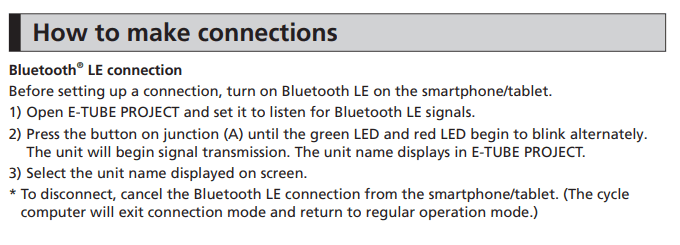
The road junction A (SM-EW90 / EW-RS910) manual mention that you can press-and-hold the button on the junction box to enable bluetooth connection mode… and it is not wrong.
It just isn’t completely right either.
What the manual fails to clearly mention is that you also need a Wireless Unit or D-fly, or a System Information Display. Without either of those you will not be able to connect to the bike using your mobile phone or tablet, no matter how hard you try.
Now, the mountain bike junction A SC-MT800 and SC-M9051 are supposed to display a 'C' when they are in connection mode. Unfortuately they don't always. The recommended way to connect them to your mobile app is as follows:
- Start the E-Tube app
- Enable Bluetooth on your phone
- Tap the 'connect' button in the mobile app
- Now hold the button junction button for 0.5 second and release
- The SC-MT800 / SC-M9051 will now appear on your phone. Tap it to connect